
How to Withdraw Money from Ludo Bonus App
Withdraw money from your Ludo Bonus account by using the withdrawal options available inside the app. Follow the steps below to add your wallet, enter the withdrawal amount, submit the request, and check your withdrawal details.

How to Add a Withdrawal Wallet in Ludo Bonus
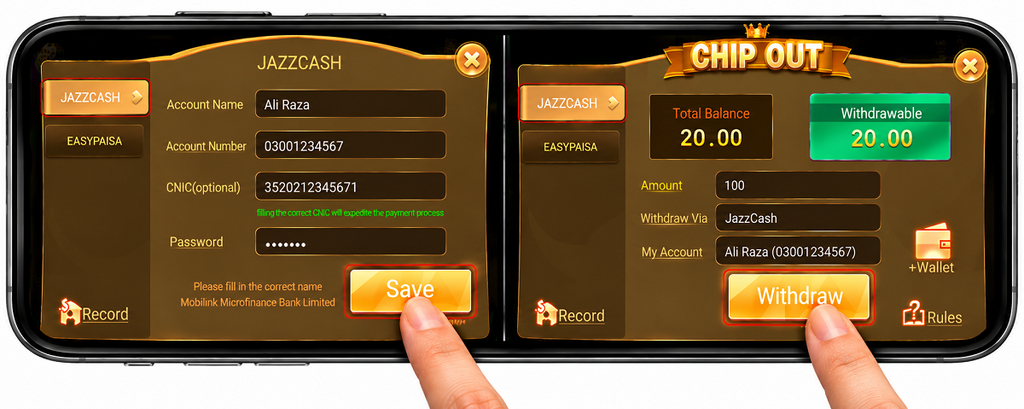
Before making your first withdrawal, open the withdrawal section in the Ludo Bonus app and add the wallet where you want to receive your money. JazzCash and Easypaisa are available as wallet options.
Step1: Choose JazzCash or Easypaisa
Open the Chip Out section and choose JazzCash or Easypaisa as your withdrawal wallet.
Step2: Enter the Account Name
Enter the account holder's name in the Account Name field. Make sure the name matches the wallet details you want to save.
Step3: Enter the Account Number
Enter your 11-digit wallet account number carefully in the Account Number field. Check the number before continuing.
Step4: Add CNIC If You Want
The CNIC field is optional. You can save your wallet without entering a CNIC. If you choose to add it, enter the 13-digit CNIC requested by the app.
Step5: Enter Your Password
Enter the required password in the Password field. Remember this password because it is important if you need to change your saved wallet details later.
Step6: Tap Save
Check the account name, wallet number, and other details, then tap Save to add the withdrawal wallet to your account.
How to Withdraw Money from Ludo Bonus
After your wallet has been added, return to the Chip Out screen. Check your total balance and withdrawable balance before submitting a withdrawal request.
Step1: Select Your Withdrawal Method
Choose JazzCash or Easypaisa from the withdrawal options and make sure the correct saved wallet is selected.
Step2: Check the Withdrawable Balance
Check the amount displayed under Withdrawable. This shows the balance currently available for withdrawal.
Step3: Enter the Withdrawal Amount
Enter the amount you want to withdraw in the Amount field. Make sure the amount does not exceed the withdrawable balance shown on the screen.
Step4: Check Withdraw Via and My Account
Review the Withdraw Via and My Account details to make sure the correct payment method and saved wallet are selected.
Step5: Tap Withdraw
Check the withdrawal details one more time, then tap Withdraw to submit your request.
How to Check Ludo Bonus Withdrawal Record
After submitting a withdrawal request, you can use the Record section to review your withdrawal information. Open Record and switch to the Withdraw section to check the available transaction details.
Check the Order Number
The withdrawal record can display an order number for the submitted request. Keep this information available if you need to review the transaction later.
Check the Withdrawal Amount
Review the amount shown in the withdrawal record and make sure it matches the amount you requested from your available balance.
Check the Time and Status
The record can also show the transaction time and current status. Use this information to check whether a recent withdrawal request is still being processed or has been updated.
How to Change a Saved Withdrawal Wallet
If you need to change your saved JazzCash or Easypaisa wallet, open the wallet details from the Chip Out section and follow the account change process shown by the app. Enter the correct new account information before saving it.
Keep the password used with your wallet details available. The password is important when you need to change the saved withdrawal wallet later.
Is CNIC Required for Ludo Bonus Withdrawal?
The wallet form marks the CNIC field as optional. You can add and save a withdrawal wallet without entering a CNIC. If you decide to provide it, the form asks for a 13-digit CNIC.
The app also states that entering the correct CNIC can help expedite the payment process. This does not make the CNIC field mandatory for saving the wallet.
Common Ludo Bonus Withdrawal Problems
If a withdrawal does not work as expected, check the saved wallet, available balance, and withdrawal record before submitting another request.
Withdrawal Wallet Is Not Showing
Check whether your JazzCash or Easypaisa account details were saved correctly. If no account appears under My Account, review the wallet information and save it again if required.
Withdrawal Is Pending
If a submitted withdrawal is still pending, check its current status in the withdrawal record. Avoid repeatedly submitting the same request while the previous transaction is still being processed.
Withdrawable Balance Is Too Low
Check the Withdrawable amount displayed on the Chip Out screen. The total balance and withdrawable balance are shown separately, so use the withdrawable figure when entering your request amount.
Before Submitting a Withdrawal
Check the wallet type, account holder name, account number, withdrawal amount, Withdraw Via option, and My Account details before tapping Withdraw. A wrong wallet number or account detail can cause problems with the request.
Keep your wallet information and transaction record available until the withdrawal status has been updated. Do not share your wallet password or other private account credentials with other people.
Get Ludo Bonus on Android
If the app is not installed on your Android phone, you can download the Ludo Bonus APK first. After installation, open the app and use the Chip Out section when you want to add a withdrawal wallet or submit a withdrawal request.
Ludo Bonus Withdrawal FAQs
Can I withdraw from Ludo Bonus with JazzCash?
JazzCash appears as a withdrawal wallet option in the Chip Out section. Add your JazzCash account details, save the wallet, and select it when submitting a withdrawal.
Can I use Easypaisa for withdrawal?
Easypaisa is also shown as a wallet option in the Chip Out section. Select Easypaisa and enter the requested account information when adding the wallet.
Is CNIC compulsory for adding a wallet?
No. The wallet form identifies CNIC as an optional field, so the wallet can be saved without entering a CNIC.
Why is the wallet password important?
Keep the password you use with the wallet details safe because it is important if you need to change the saved wallet information later.
Where can I check my withdrawal status?
Open Record and select the Withdraw section. The available record can show transaction information such as the order number, amount, time, and status.
Why are total balance and withdrawable balance different?
The Chip Out screen displays Total Balance and Withdrawable separately. When making a withdrawal, check the Withdrawable amount because that is the balance shown as available for withdrawal.
Ludo Bonus Withdrawal Guide
To withdraw money, first add the correct JazzCash or Easypaisa wallet and keep the wallet password available for future account changes. Check your withdrawable balance and saved account details before submitting the request, then use the withdrawal record to review its status.